A while ago I was pentesting a known healthcare platform. They allow you to login, access your medical records, download your studies, get appointments with different doctors, and so on, all managed from a profile in their systems.
In one of the functionalities they offered, there was the possibility to send your medical studies via email. The feature allowed you to select one of your listed studies, specify any email, and send it so you can receive it in your inbox.
As with any functionality I’m testing, I first execute it as-is, without modifying anything, while also reading requests and responses being sent using Burp Suite. Then I start to play with parameters and understand a bit how the data flows.
I decided to take a look at the flow of logic, and one particular element caught my eye: not only the filename attribute was required, but also a path element containing a full path of the actual file in the server.
Of course, this will raise all the alarms for any pentester checking this site. By manually modifying this path, it might be possible to read files that were not meant to be public, in case they didn’t restrict the file location.
I changed the path value manually, pointing to a different file in the server. Prior to this, I was able to determine what kind of server it was: Linux. This is crucial for LFI/RFI or path traversal exploitations, since only the payloads that belong to that OS will be successful (in case that a real vulnerability is present, of course).
I sent the request and obtained the same response as before HTTP 200 OK.
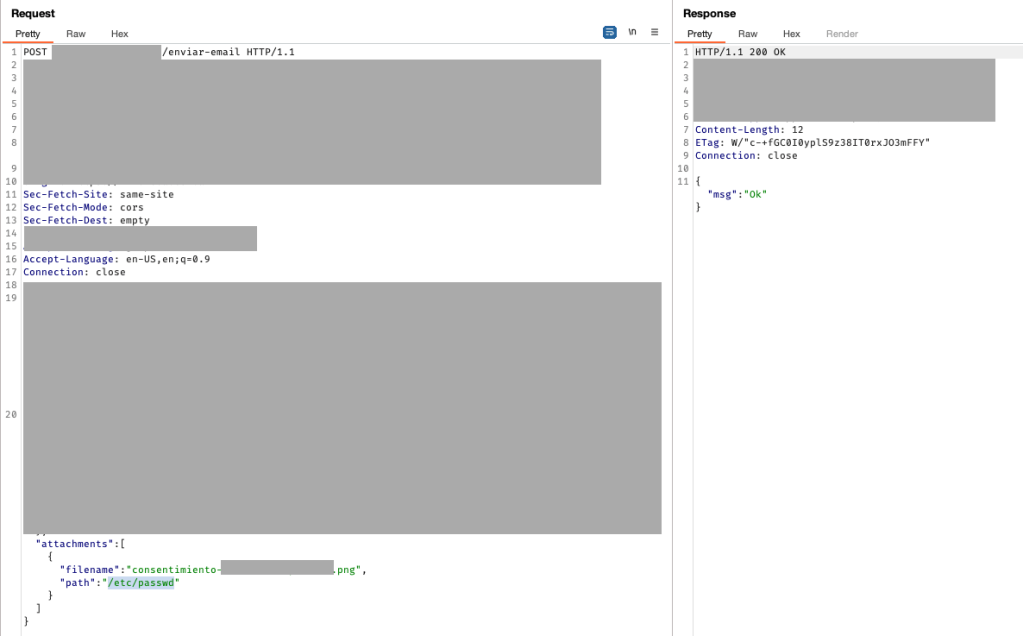
After a couple of seconds, I received an email in my inbox containing a file named after the filename attribute determined above, and the content of the file was given by the path variable sent.
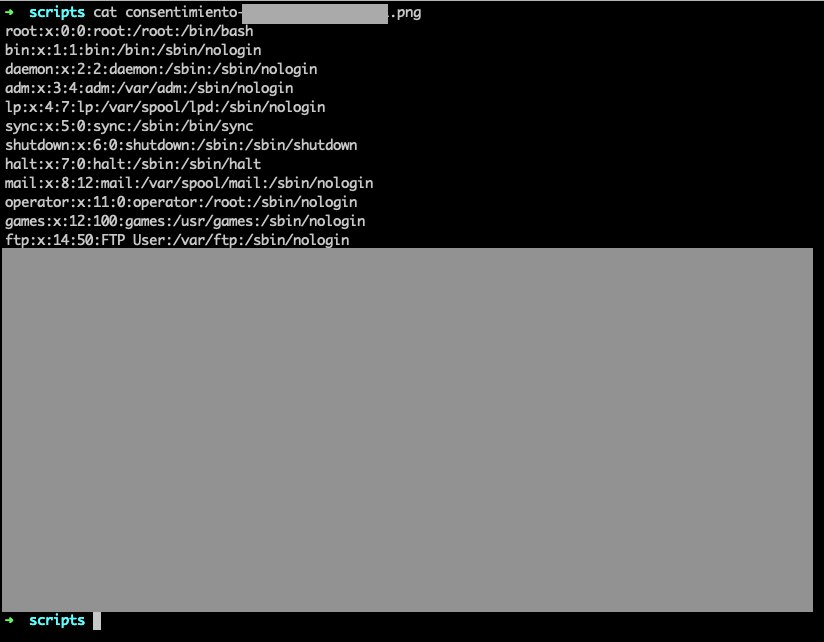
Clearly, the back-end server function handling that endpoint trusts that the path will not be modified. As we can see, that’s just not the case.
I was able to read any file that I wanted, which proved that the web server was running as root. So, not only they didn’t validate the variable and allowed outside users to get any file, but also the webserver was running as root. Double bug? Or it’s a feature?
The result was simply unrestricted access to any file on the server, including .ssh keys to connect via SSH, web hosts configurations, and others.
After confirming successful exploitation calling different common files, I stopped and wrote a concise report with different recommendations for solutions.
 Lautaro Colombo
Leave a comment